24 May 2023

How to show the current time and date in Lightning Web Components (LWC) in Salesforce

use JavaScript's Date object and the LWC template syntax. Here's an example of how you can achieve this:

Open your LWC component's JavaScript file (e.g., myComponent.js) and define a property to store the current date and time.


import { LightningElement, track } from 'lwc';

export default class MyComponent extends LightningElement {

    @track currentDate;

    connectedCallback() {

        this.getCurrentDateTime();

    }

    getCurrentDateTime() {

        setInterval(() => {

            const now = new Date();

            this.currentDate = now.toLocaleString(); // Format the date and time as per your preference

        }, 1000); // Update every second

    }

}

Open your LWC component's HTML file (e.g., myComponent.html) and use the currentDate property to display the date and time.


<template>

    <div>{currentDate}</div>

</template>


 Now, when you use the MyComponent in your Lightning page, it will continuously update to display the current date and time.

Note: The example above sets the interval to update the date and time every second (1000 milliseconds). You can adjust the interval value to your desired frequency.


To display the current date and time in a specific format in Lightning Web Components (LWC) in Salesforce, you can use the toLocaleString method of the Date object and specify the desired format options. Here's an example:

import { LightningElement, track } from 'lwc';

export default class MyComponent extends LightningElement {

    @track currentDate;

    connectedCallback() {

        this.getCurrentDateTime();

    }

    getCurrentDateTime() {

        setInterval(() => {

            const now = new Date();

            const options = {

                year: 'numeric',

                month: 'long',

                day: 'numeric',

                hour: 'numeric',

                minute: 'numeric',

                second: 'numeric',

                hour12: true // Use 12-hour format (true) or 24-hour format (false)

            };

            this.currentDate = now.toLocaleString('en-US', options); // Adjust the locale as per your requirement

        }, 1000); // Update every second

    }

}


To display the current date and time in Indian date format using Lightning Web Components (LWC) in Salesforce, you can modify the options object in the toLocaleString method to match the desired format. Here's an example:

import { LightningElement, track } from 'lwc';

export default class MyComponent extends LightningElement {

    @track currentDate;

    connectedCallback() {

        this.getCurrentDateTime();

    }

    getCurrentDateTime() {

        setInterval(() => {

            const now = new Date();

            const options = {

                weekday: 'long',

                year: 'numeric',

                month: 'long',

                day: 'numeric',

                hour: 'numeric',

                minute: 'numeric',

                second: 'numeric',

                hour12: true, // Use 12-hour format (true) or 24-hour format (false)

                timeZone: 'Asia/Kolkata', // Set the desired time zone

                timeZoneName: 'short' // Show abbreviated time zone name

            };

            this.currentDate = now.toLocaleString('en-IN', options); // Use 'en-IN' locale for Indian date format

        }, 1000); // Update every second

    }

}


13 Mar 2023

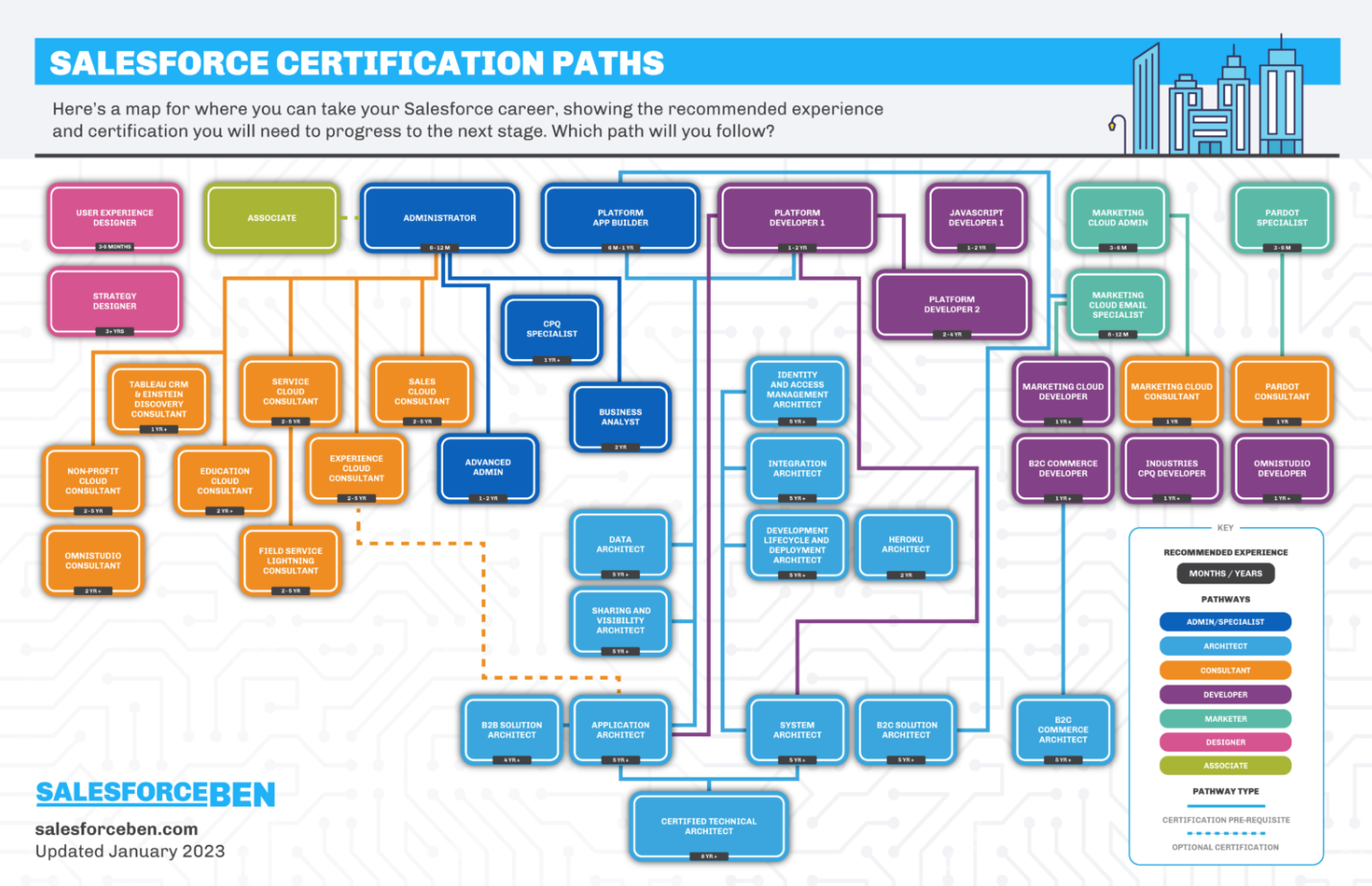
Salesforce - Certification Path 2023

 Salesforce offers a variety of certifications that validate expertise in various aspects of their platform. Here is a list of Salesforce certifications:

  1. Salesforce Certified Administrator
  2. Salesforce Certified Advanced Administrator
  3. Salesforce Certified Sales Cloud Consultant
  4. Salesforce Certified Service Cloud Consultant
  5. Salesforce Certified Community Cloud Consultant
  6. Salesforce Certified Platform App Builder
  7. Salesforce Certified Platform Developer I
  8. Salesforce Certified Platform Developer II
  9. Salesforce Certified Marketing Cloud Email Specialist
  10. Salesforce Certified Marketing Cloud Administrator
  11. Salesforce Certified Marketing Cloud Consultant
  12. Salesforce Certified Pardot Specialist
  13. Salesforce Certified Pardot Consultant
  14. Salesforce Certified Field Service Lightning Consultant
  15. Salesforce Certified CPQ Specialist
  16. Salesforce Certified JavaScript Developer I
  17. Salesforce Certified Heroku Architecture Designer
  18. Salesforce Certified Integration Architecture Designer
  19. Salesforce Certified Sharing and Visibility Designer
  20. Salesforce Certified Data Architecture and Management Designer
  21. Salesforce Certified Identity and Access Management Designer
  22. Salesforce Certified Mobile Solutions Architecture Designer
  23. Salesforce Certified Technical Architect
  24. Salesforce Certified B2B Solution Architect
  25. Salesforce Certified B2C Solution Architect


Note: This list may not be exhaustive as Salesforce frequently updates and adds new certifications.


Salesforce Certification Path 2023

Salesforce - Important Website Links

Salesforce 

Here are some important website links related to Salesforce:

  1. Salesforce Homepage: https://www.salesforce.com/
  2. Salesforce Trailhead: https://trailhead.salesforce.com/
  3. Salesforce AppExchange: https://appexchange.salesforce.com/
  4. Salesforce Developer Center: https://developer.salesforce.com/
  5. Salesforce Help and Training: https://help.salesforce.com/home
  6. Salesforce Trust Status: https://status.salesforce.com/
  7. Salesforce Events: https://www.salesforce.com/events/
  8. Salesforce Blog: https://www.salesforce.com/blog/
  9. Salesforce YouTube Channel: https://www.youtube.com/user/salesforce
  10. Salesforce Community: https://trailblazer.salesforce.com/

Registering for an Exam


These links provide access to various resources and tools related to Salesforce, including documentation, training, support, events, and more. 

11 Jan 2023

Will ChatGPT Replace Google as an “Answer Engine”?

ChatGPT is a chatbot launched by OpenAI in November 2022. 

It is built on top of OpenAI's GPT-3 family of large language models and is fine-tuned with both supervised and reinforcement learning techniques.  


ChatGPT Examples: Questions to Ask

Users can ask all kinds of questions to ChatGPT to get straightforward and uncluttered responses in return. For example, you can use the tool as an encyclopedia and ask questions. For instance, “define Newton’s laws of motion” or “write a poem”. Additionally, you may ask the AI tool to design a computer program and demonstrate all the different combinations to arrange the letters of a word.


Who Created ChatGPT?

Who Created Chatbot GPT?

ChatGPT is Open AI’s brainchild. Open AI is an artificial intelligence research startup organization whose mission is to create an AI system that is safe and beneficial. 

The company has previously made headlines with GPT-3, which can produce text that sounds like it was written by a human, and DALL-E (a generative AI tool), which creates AI art/digital images from natural language descriptions. 

How Does ChatGPT Work?

With an understanding of what is ChatGPT, let’s explore how it works. At its foundation, ChatGPT is a GPT3 and GPT 3.5-based large language model. This AI tool applies machine learning algorithms to a massive corpus of text to respond to users’ requests using language that sounds surprisingly human-like.  

According to OpenAI, ChatGPT enhances its capability through reinforcement learning, which depends on human feedback. The business hires human AI trainers to interact with the model while assuming the roles of both a user and a chatbot. Trainers compare responses given by ChatGPT to human replies and grade their quality to reinforce human-like conversation approaches. 


Will ChatGPT Replace Google as an “Answer Engine”?

It can be helpful to ask questions to a computer and receive prompt responses, and ChatGPT does exactly that. Google typically provides users with links to websites it considers to be relevant as well as its own proposed answers to user inquiries. Often, ChatGPT responses surpass Google’s recommendations as it uses the latest, well-trained AI algorithms.  

However, before trusting ChatGPT replies, users should confirm the information from authentic sources. Verifying the accuracy of ChatGPT answers takes effort because, unlike Google, it uses raw text without any links or citations. Moreover, as ChatGPT continues to make progress, Google is also building large language models of its own and using AI extensively in its search algorithms. 

Therefore, to think that ChatGPT will replace Google’s answer engine sounds a bit far-fetched, but it is definitely showing the way toward it. 

What are ChatGPT’s Limitations?

  • Wrong Answers

ChatGPT is a large language model that is continuously being trained to increase the accuracy of responses. However, since it is a brand-new tech, the model has not yet undergone sufficient training. Therefore, the AI chatbot may provide wrong answers. Due to this, StackOverflow has banned ChatGPT, saying: “Overall, because the average rate of getting correct answers from ChatGPT is too low, the posting of answers created by ChatGPT is substantially harmful to our site and to users who are asking or looking for correct answers.”

  • Limitations in Training Data and Bias Issues

Like many AI models, ChatGPT has limitations in its training data. Both the constraints in training data and bias in the data can create a negative impact on the model’s output. In fact, ChatGPT has shown bias when it comes to training minority data groups. Therefore, it’s important to improve the data transparency of the models to reduce bias in this technology.

  • Sustainability

On Twitter, there is a conversation thread regarding how many Graphics Processing Units (GPUs) are required to run ChatGPT. The takeaway here is that running ChatGPT is highly expensive. Given that ChatGPT is a free product, a lot of questions are currently being raised on how sustainable the technology is in the long run. 

What Can You Create With ChatGPT?

Besides providing responses to human queries, ChatGPT can be used to do the following:

  1. Create Content

ChatGPT can be used for content creation, as it can easily write content based on a prompt. For instance, the AI tool can write a song based on a user’s command. Moreover, ChatGPT can also help users to add a touch of elegance to their writing style and achieve their literary goals.

  1. Generate AI Art

Since the introduction of DALLE-2, Midjourney, and other artistic AI tools, AI art generators have been at the forefront of the creation of artistic images. Moving ahead, OpenAI’s ChatGPT has enormous potential in producing richly detailed Augmented Reality (AR) scenarios, when prompted.

  1. Write Code and Debug

ChatGPT can process code, write code, and help developers debug codes as well. For instance, it can be used to generate SQL queries. Since knowledge of SQL is imperative for data scientists, using ChatGPT to enhance SQL skills can accelerate your career and take it to the next level.

  1. Manage and Manipulate Data

Unstructured data is hard to sort, manage, and organize, making it redundant. ChatGPT comes to the rescue as it can convert unstructured data into a structured format by manipulating data. For instance, the tool can be used to add data to a table, make indexes, and understand JSON queries. 

  1. Explain and Tutor

It is interesting how well ChatGPT can explain words, code, and even physics. As the AI tutor capabilities of ChatGPT develop and become more refined in the coming years, it can dramatically alter the way students interact with the outside world. 

Consequently, ChatGPT will also have a huge impact on the education tech industry. Many edtech companies can now teach the fundamentals of a topic and make use of ChatGPT to offer students a platform to ask questions and clear their doubts. 


4 Jan 2023

Update Composer In Ubuntu

 sudo apt-get remove composer -y

php -r "copy('https://getcomposer.org/installer', 'composer-setup.php');"

php composer-setup.php --install-dir=/usr/bin --filename=composer

composer self-update